Table of Contents
- What Meshtastic is
- The legal frame in Europe
- Hardware worth considering
- Heltec LoRa 32 V3, around 23 to 30 euros
- LILYGO T-Beam, from around 47 euros
- LILYGO T-Echo, 60 to 80 euros
- RAK WisBlock, 27 to 47 euros
- Seeed SenseCAP T1000-E, around 48 euros
- LILYGO T-Deck, from around 70 euros
- Station G2
- Setup in fifteen minutes
- Channels and encryption
- Range, honestly
- Roles in the network
- MQTT: when the mesh reaches the internet
- More than text
- GPS and positions
- Sensors
- Telemetry
- Solar nodes, the backbone
- What licensed amateurs can add
- The situation in Austria
- Practical tips
- Antenna first
- Height beats power
- Build for weather
- Configure frugally
- Pick the preset deliberately
- Conclusion
- Sources
- Transparency Notice
Sending text messages, sharing GPS positions and receiving sensor data, without the internet, without a mobile network, without mains power. And all of it with hardware costing around 35 euros. What sounded like a niche project a few years ago is now a worldwide movement: Meshtastic, the open-source project for LoRa-based mesh communication.
This article gets hands-on. It covers which hardware makes sense, how setup works, what roles a node can take in the network, what the rules actually say and how things look in Austria. If you want to settle the system question first, the comparison is in MeshCom vs. Meshtastic, and for the wider picture see PMR vs. Meshtastic vs. CB radio.
What Meshtastic is
Meshtastic is open-source firmware that runs on cheap LoRa microcontrollers and turns them into a decentralised mesh. Every device receives messages and forwards other people's packets, so range grows with each additional node. There is no central server, no operator and no sign-up.
Kevin Hester started the project in early 2020. Hundreds of volunteers have carried it since, firmware ships at a brisk pace, and supported hardware ranges from 20-euro boards to professional gateways. How robust that has become was on display at Hamvention 2024, where 2,000 to 2,500 nodes were active on site at times, running the special Short Turbo preset for dense networks.
The legal frame in Europe
This deserves a close look, because a lot of half-knowledge circulates. In Europe Meshtastic does not sit somewhere around 868 MHz, it sits in a clearly defined slice of it.
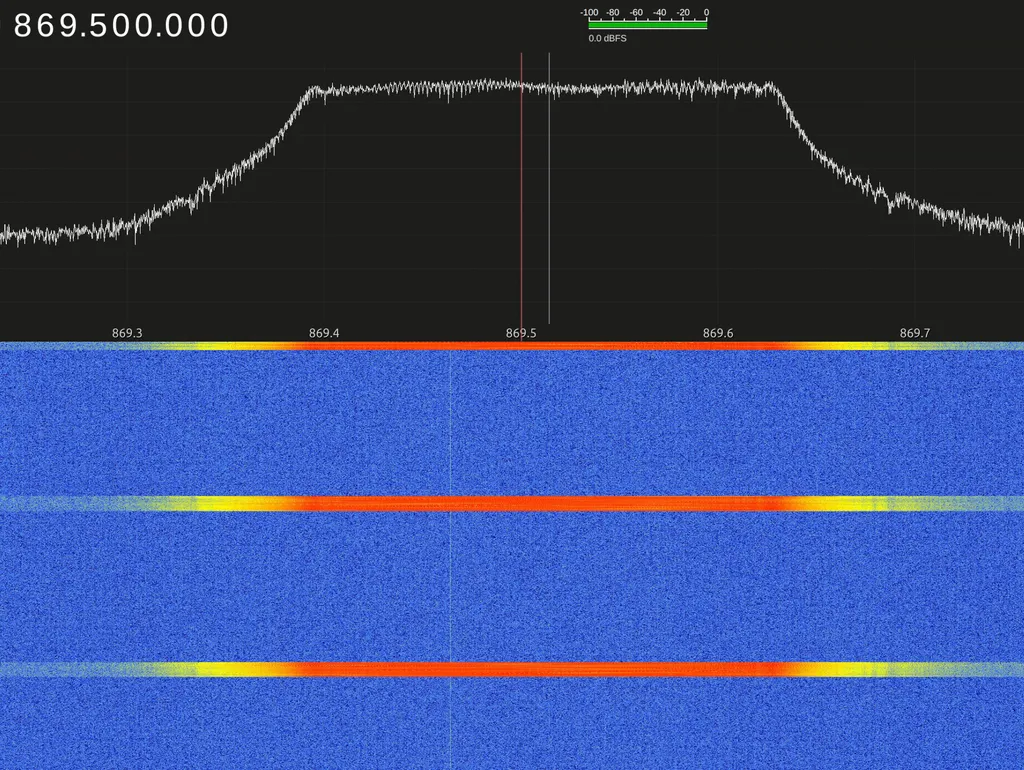
The EU_868 region occupies 869.40 to 869.65 MHz. Up to 500 mW ERP is permitted there, that is 27 dBm, with a 10 percent duty cycle. The default LongFast channel uses slot 1 with a centre frequency of 869.525 MHz. That is considerably more power than the frequently quoted 25 mW, which applies to other parts of the 863 to 870 MHz band.
What matters is this: legality comes from the combination of device, region setting, antenna and radiated power, not from the band alone. Put a high-gain antenna on a board already transmitting at full power and you can exceed the permitted ERP without noticing. And a radio amateur who moves to amateur frequencies is bound by amateur radio rules, including callsign identification and the ban on encryption.
Hardware worth considering
A word on prices first, since that is always the opening question. The figures below are September 2026 street prices at EU dealers who ship to Austria, VAT included. Ten euros between shops for the same board is normal, so comparing pays off. Three things come on top. A usable 868 MHz antenna costs 10 to 17 euros and is practically never included. When importing directly from the Far East, insist on the 868 MHz variant, because the widespread 915 MHz devices may not be operated here. And orders from outside the EU attract import VAT and, depending on value, customs charges, which often eats the saving.
Heltec LoRa 32 V3, around 23 to 30 euros
The budget entry. An ESP32-S3 with a small OLED and a LoRa chip, compact and well documented. GPS and a battery holder are missing and can be added. Perfectly fine as a fixed node or for a first try.
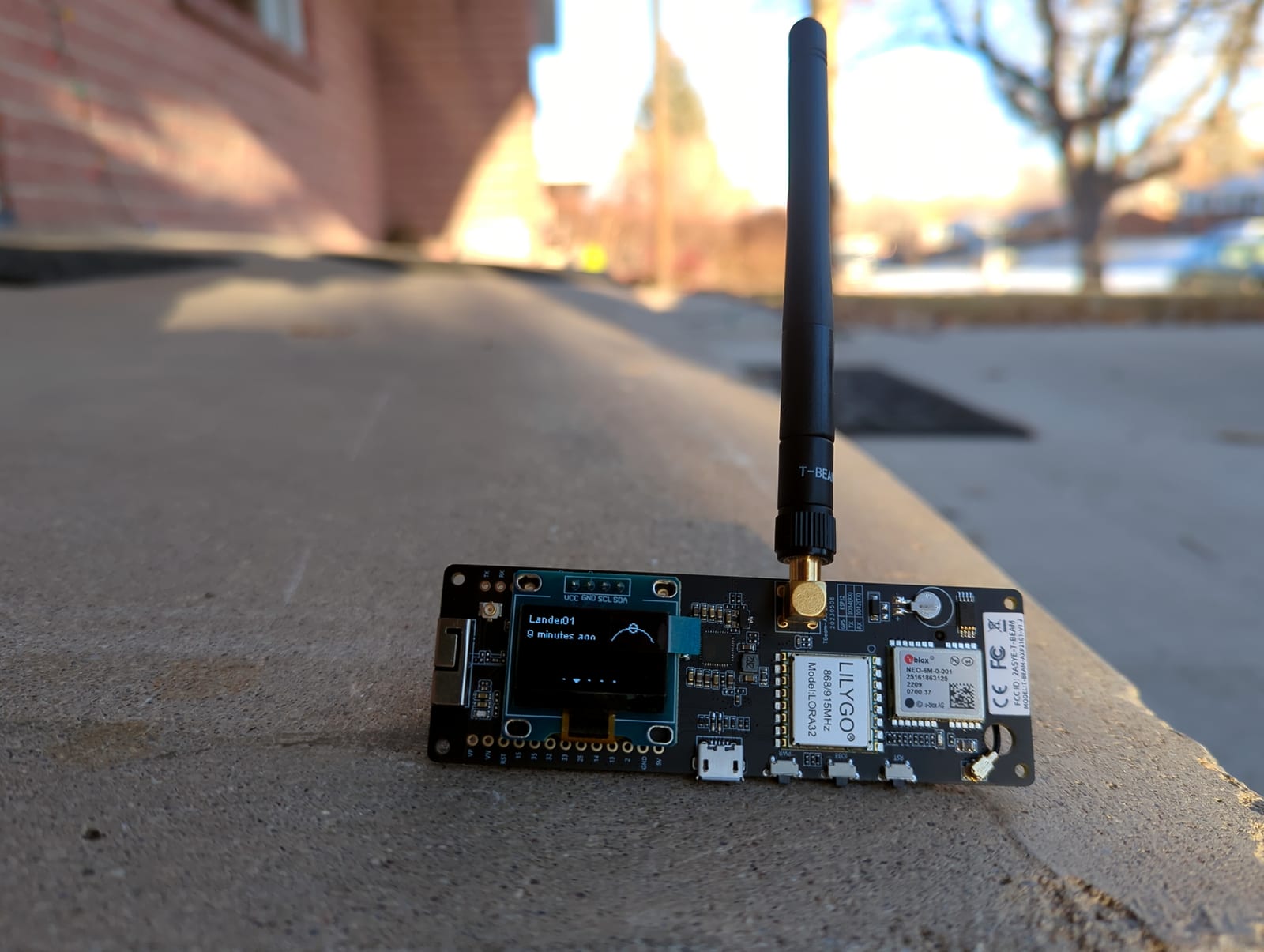
LILYGO T-Beam, from around 47 euros
The all-rounder with GPS, an 18650 holder and a LoRa module. At 24 to 48 hours of runtime it is the classic portable node for hiking. The GPS feeds automatic position reports into the mesh. The uprated T-Beam Supreme sits noticeably higher, usually between 60 and 75 euros.
LILYGO T-Echo, 60 to 80 euros
The frugal one. Built on the nRF52840, which draws far less than an ESP32. With an e-ink display, GPS and a battery it lasts a week under moderate use. Buying straight from the manufacturer is cheaper, at the cost of waiting for delivery.
RAK WisBlock, 27 to 47 euros
The modular system with an nRF52840 that takes GPS, sensors and a solar charge controller as plug-on modules. Deep sleep draws under 10 microamps, which is why it is the first choice for solar nodes. Price depends on the baseboard, with starter kits from about 27 euros and around 47 euros for the larger base. Anyone coming from the Raspberry Pi world knows the building-block idea.
RAK now also sells finished devices for anyone who would rather not solder: the WisMesh Tag at about 48 euros, the WisMesh Pocket V2 at 99 euros and the Repeater Mini V2 from roughly 100 euros.
Seeed SenseCAP T1000-E, around 48 euros
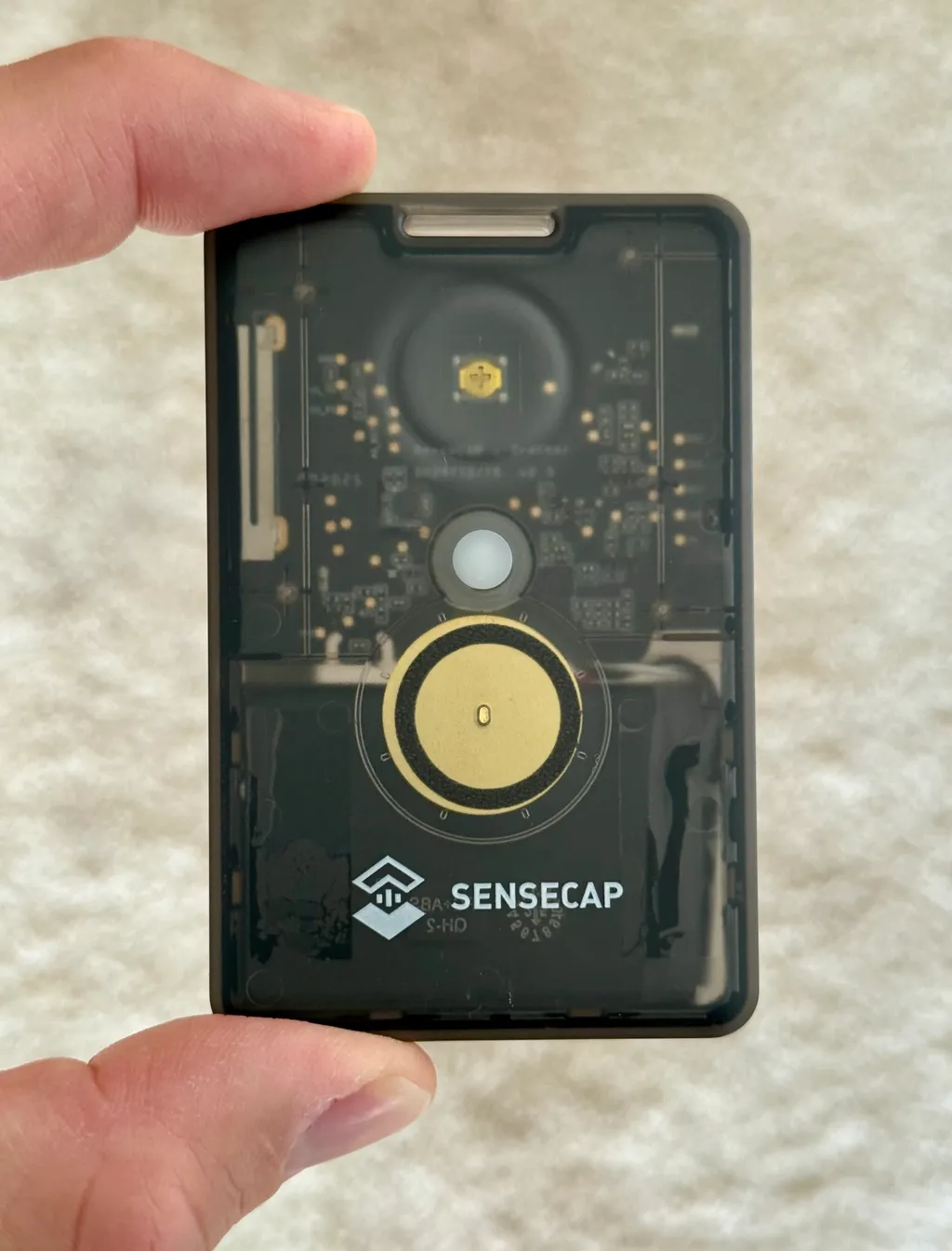
A tracker the size of a credit card. A finished device rather than a bare board, with GPS, buzzer and battery, thin enough for a pocket. For anyone who simply wants a working thing and no enclosure project, this is the easiest way in.
LILYGO T-Deck, from around 70 euros
The standalone unit with a QWERTY keyboard, colour display and GPS. Messages can be typed on the device itself, no phone required. Handy when you do not want to pull out your phone every few minutes. The Plus variant with battery and GPS usually runs 85 to 120 euros in Europe.
Station G2
The heavy hitter with a 5-watt output stage, Ethernet and a proper enclosure. That power level is not permitted on the ISM band, so the device belongs on amateur frequencies and in licensed hands. As a hilltop site or fixed gateway it is a different league. We could not find a reliable Austrian list price, sales run through Unit Engineering with EU shipping and VAT handled by a German logistics partner. If you order, insist on the 868 MHz version.
Setup in fifteen minutes
- Flash the firmware. Open flasher.meshtastic.org in Chrome or Edge, pick the board, connect via USB, flash. No download needed, the web flasher does everything.
- Install the app. Meshtastic for Android or iOS, or the web client at client.meshtastic.org.
- Pair. Power up the board, search in the app, connect via Bluetooth. The default code is 123456.
- Set the region. Set the region to EU_868 in the settings. Skip this and the device either stays silent or transmits on the wrong frequency.
- Choose a name. A short node name, twelve characters maximum. Radio amateurs usually use their callsign.
- Send. Type a message on the primary channel. Every node in range receives it and passes it on.
The default preset is LONG_FAST, a sound compromise between range and speed. The one hard rule: every node in a mesh must run the same preset, otherwise they simply do not hear each other.
Video tip (German): the Funkwelle channel starts its tutorial series with the fundamentals of LoRa and the Meshtastic network before touching any hardware.
Channels and encryption
Meshtastic supports up to eight parallel channels per device. Each channel has a name and a pre-shared key, and encryption uses AES in CTR mode.
The part many people miss: the key for the default channel is publicly known. Anyone who installs Meshtastic can read along there. That is deliberate, LongFast is the open community frequency. Anything that should stay private needs its own channel with its own key.
Since firmware 2.5 direct messages additionally use public key cryptography. Devices exchange their public keys themselves, the message is end to end encrypted, and nobody has to hand a shared key around. The 2.7 line added packet signing based on XEdDSA, which lets a receiver check where a packet actually came from.
For radio amateurs the logic inverts: encryption is not allowed on amateur frequencies. That is what the licensed operator mode is for, disabling encryption and sending the callsign.
Range, honestly
- Urban: 0.5 to 2 kilometres with the stock antenna, buildings attenuate heavily at 868 MHz.
- Rural: 5 to 20 kilometres depending on terrain and height.
- Mountain to mountain with line of sight: 50 kilometres and beyond, where LoRa really shows its strength.
- Record: 331 kilometres, set on 5 May 2024 between Austria and Italy across the Adriatic, using RAK4631 nodes, collinear antennas and the VERY_LONG_SLOW preset.
The biggest lever is not firmware but antenna and height. At 868 MHz propagation is almost optical. The same node might manage 500 metres on the ground floor and ten times that from a roof.
Roles in the network
- CLIENT: the default. Sends, receives and forwards. Correct for almost everyone.
- CLIENT_MUTE: sends and receives its own traffic but forwards nothing. Useful in very dense networks.
- ROUTER: optimised for forwarding, display and Bluetooth off. Meant for permanent, usually solar powered sites in exposed positions.
- ROUTER_LATE: like ROUTER but waits briefly. If a closer node has already relayed the packet, this one stays quiet, which avoids duplicates.
- REPEATER: forwards everything, including packets already heard. Only sensible at genuine bottlenecks.
The community is unusually united here: as few routers as possible at strategically good points, everything else as a client. Too many routers create packet storms that clog the network instead of growing it. Since version 2.6 the NextHopRouter helps as well. For direct messages the firmware learns from the acknowledgements which node actually relayed the packet, and next time it addresses that one path instead of flooding the whole network.
Video tip (German): firmware installation, first setup and an initial field test, step by step.
MQTT: when the mesh reaches the internet
A node with Wi-Fi can bridge between the mesh and the internet and hand messages to an MQTT broker. That connects islands that are far apart.
A few things are worth knowing about the public broker at mqtt.meshtastic.org. The connection always uses TLS on port 8883, whatever the toggle in the app suggests. The default channel there carries heavy traffic, which can overwhelm weaker devices. Position data is deliberately blurred to protect privacy. And because the default channel key is known, anything going out that way is effectively readable by everyone.
If you want this done cleanly, run your own broker. How that works and how to connect to ours is described in OERadio goes Mesh. The result can be followed live on our Meshmap, which shows the known nodes in Austria and Europe. A broker on a Raspberry Pi is also the foundation for everything else, such as a bridge into HAMNET.
More than text
GPS and positions
Every node with GPS reports its position, and the app shows all nodes on a map. On a group trip everyone can see where the others are at a glance. Via MQTT and suitable software those positions can also be fed into the APRS network.
Sensors
The firmware knows more than 30 sensors. The common ones in practice: BME280 and BME680 for temperature, humidity and pressure, INA219 or INA260 for current and voltage, which solves half the troubleshooting on a solar node, plus pressure sensors for weather and even Geiger counter modules. Readings flow into the mesh automatically and can be evaluated over MQTT, which turns the network into a distributed measurement system.
Telemetry
Every node reports battery state, signal quality as SNR and RSSI, uptime and airtime usage. Airtime is the figure to watch, because it shows how close the network runs to the duty cycle limit.
Solar nodes, the backbone
The networks that stay interesting are the ones where somebody puts a node somewhere high and runs it self-sufficiently. That works because nRF52840 boards are extremely frugal.
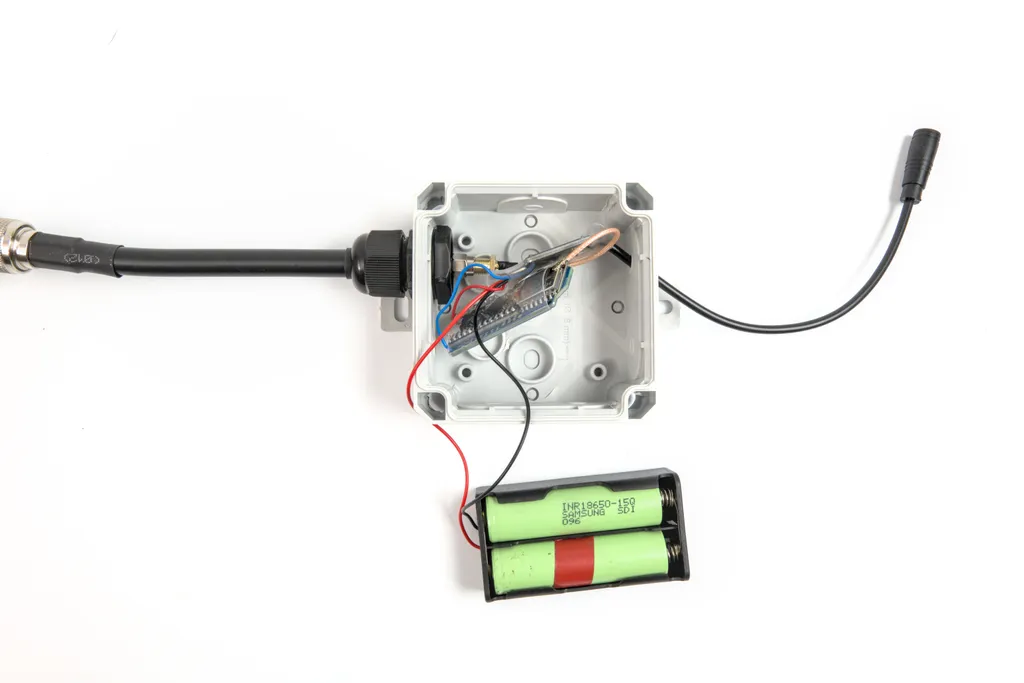
- Consumption: a RAK WisBlock with nRF52840 draws about 8 mA while receiving and under 10 microamps in deep sleep.
- Panel: a small 1-watt 6-volt panel is enough for continuous operation.
- Battery: one 18650 cell at 3,000 mAh covers several dull days.
- Charging: the RAK baseboard already includes a solar charge controller.
- Enclosure: an IP67 box from the electrical trade, antenna outside, glands on every cable entry.
For blackout preparedness such nodes are particularly valuable, because they keep running when power and mobile networks are gone. Anyone building this out systematically will find the complements in the emergency go-box and in Winlink for longer messages.
What licensed amateurs can add
- Licensed operator mode: store the callsign, encryption off, operation under amateur radio rules.
- More power: amateur frequencies allow entirely different levels than the ISM band, which is what devices like the Station G2 are built for.
- Bridges: MQTT can feed positions into APRS or run gateways inside HAMNET, without any commercial internet.
- Combining networks: the narrowband mesh complements an AREDN network where its directional links do not reach.
The situation in Austria
Austria is notably active on LoRa mesh, but spread across several systems, which regularly confuses newcomers.
For Meshtastic itself, meshtastic.at collects build guides and projects, from weatherproof outdoor nodes to pagers with a reply function and remote maintenance over GSM. The focus is firmly on building things rather than on network statistics.
Alongside it sits MeshCom as the Austrian amateur radio variant, now at version 4.0, and more recently MeshCore, which currently draws the most new participants in Carinthia. How fast that can go is visible in the growth to 32 sites within two weeks, including an observed link over 126.9 kilometres with half a watt. For the people behind the boxes, see the CarinthiaMesh repeater portraits.
In practice many operators run both. The hardware is the same, only the firmware differs, and a second node costs less than dinner.
Video tip: a practical comparison of common LoRa mesh devices, useful before a first purchase.
Practical tips
Antenna first
The supplied stubs are desk accessories. Even a quarter-wave wire, roughly 8.2 centimetres for 868 MHz, with a decent ground plane changes range dramatically. Ready-made SMA antennas start around five euros. No firmware setting comes close.
Height beats power
One more metre of height is usually worth more than another decibel. Given the choice, go to the roof, not the balcony.
Build for weather
Outdoor nodes need an IP67 enclosure and the antenna belongs outside it. Metal and condensation eat range. Seal cable entries with glands and add a desiccant pack.
Configure frugally
Position reports every 15 to 30 minutes, telemetry every 30 to 60, power saving on. A T-Echo then lasts a week on a small battery, and a RAK solar node runs as long as the cell holds up.
Pick the preset deliberately
LONG_FAST fits nearly every case. An isolated mountain node with few messages benefits from LONG_SLOW, dense urban networks from MEDIUM_FAST. The whole mesh has to agree, though.
Conclusion
Meshtastic stopped being a tinkering project some time ago. Hardware is cheap, firmware is stable, routing got considerably smarter with 2.6, and the community carries the project reliably. Getting in costs about 35 to 45 euros with an antenna, plus a quarter of an hour.
The network does live on its participants, though. A single node in a valley is a nice toy, twenty nodes on well chosen sites are infrastructure. So if you are wondering whether it is worth it, look at the map rather than at your own device.
Sources
- meshtastic.org, official documentation on regions, presets, roles, encryption and MQTT
- github.com/meshtastic/firmware, releases and changes in the current 2.7 line
- Meshtastic blog on version 2.6, introduction of next-hop routing
- meshtastic.at, build guides and projects from the Austrian scene
- Wikipedia: Meshtastic, project history and context
73 – your oeradio.at editorial team
Transparency Notice
This article was researched and written with the support of AI (Claude, Anthropic) based on publicly available sources, and the content has been editorially reviewed. It was revised in September 2026: the EU_868 figures were corrected to 869.40 to 869.65 MHz with up to 500 mW ERP and a 10 percent duty cycle, instead of the 25 mW stated before. The date and preset of the 331-kilometre record were corrected as well, it was set on 5 May 2024 using VERY_LONG_SLOW. Next-hop routing, packet signing, the T1000-E and the current situation in Austria were added. Prices were checked in September 2026 at EU dealers shipping to Austria, VAT included, and vary noticeably between shops and promotions. The images come from Wikimedia Commons under free licences, with photographer and licence given in each caption. The embedded videos come from external YouTube channels and reflect their views. Corrections welcome at [email protected].