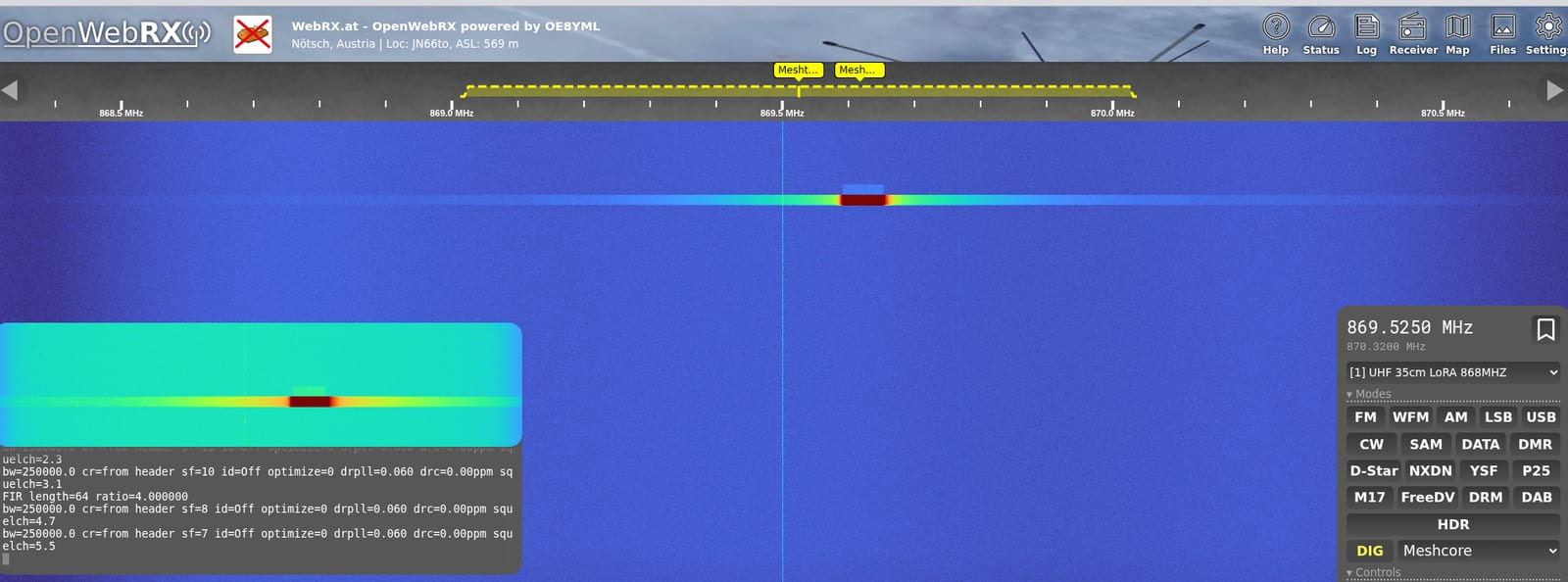
Until recently, finding out whether there is real mesh activity in your valley meant putting up a node and waiting. There is another way now: OpenWebRX+ decodes LoRa packets right in the browser, covering Meshtastic, MeshCore and MeshCom. You see the transmissions in the waterfall, you get the parameters of each transmission, and with Meshtastic you even get the content of the open channel.
On WebRX.at, the WebSDR run by OE8YML in Nötsch, this is set up and publicly accessible. This article explains what happens technically, which version you need, which settings have to match and where the limits are.
What is actually happening
LoRa does not modulate like voice radio, it spreads the information across a frequency sweep called a chirp. That is exactly what makes the signal so recognisable in a waterfall: diagonal streaks in an otherwise quiet band. An ordinary receiver hears nothing useful there, because there is nothing to hear. It takes a decoder that unwinds the chirps.
OpenWebRX+ brings one along. The receiver slices the relevant channel out of the spectrum, a LoRa decoder reconstructs the packets, and for Meshtastic a parser on top unpacks the payload. The decoder pane then shows the bandwidth, coding rate and spreading factor each packet was sent with. Those values come out of the packet header, so they do not have to be known in advance.
You need the right version
This is where most attempts fail: plain OpenWebRX cannot do it. What you need is the fork known as OpenWebRX+, and even there the version decides. The project's public changelog shows when each piece arrived:
- 1.2.114: integration of the LoraRX tool from dxlAPRS, plus the LoRa WAN, LoRa APRS and FANET modes and, for the first time, Meshtastic and Meshcore.
- 1.2.115: MeshCom arrives as its own LoRa mode, along with predefined LoRa bands and frequencies.
- 1.2.116: the actual Meshtastic decoder that makes the payload readable, and a parser for LoRa APRS.
So if you want all three, you want at least 1.2.116. The station in Nötsch currently runs 1.2.123, which is the version shown in the status output at the bottom left of the screenshot above.
Frequencies and bandwidths
- Meshtastic, region EU_868, LongFast preset: 869.525 MHz at 250 kHz bandwidth.
- MeshCore in Europe: 869.618 MHz, commonly 250 kHz as well.
- MeshCom in Austria: 433.175 MHz in the 70 centimetre amateur band, with 125 kHz bandwidth and a considerably higher spreading factor.
Meshtastic and MeshCore sit only 93 kHz apart and comfortably fit in the same SDR window. Even so they need separate settings, because the decoder depends on the correct centre frequency and mode. Tuning the Meshtastic channel and hoping to catch MeshCore along the way does not work.
One trap hides in the interface. In the decoder settings the bandwidth is offered as a list whose labels end in kbps. What is meant is kilohertz. The entry showing 250 is therefore the 250 kHz bandwidth that Meshtastic and MeshCore normally use in Europe, not a data rate.
Operating it in the browser
- Pick a profile. The profile selector sits at the top of the receiver panel. A profile for the 868 MHz range puts the receiver straight at the right spot in the spectrum.
- Set the mode. Below the classic modes the mode bar offers the digital decoders, among them Meshtastic, Meshcore and MeshCom.
- Click a bookmark. If bookmarks are set in the waterfall, one click gets you both frequency and mode.
- Check the bandwidth. The decoder settings have a section for LoRa messages where the bandwidth can be set per network. If it does not match the local network, the pane stays empty even though the waterfall clearly shows activity.
Usefully, the state travels in the link. To try it straight away at the station in Nötsch: MeshCore on 869.618 MHz and Meshtastic on 869.525 MHz. Both open the receiver right on the correct frequency, with the matching decoder and the squelch wide open. Behind the hash sit freq for the frequency in hertz, secondary_mod for the digital decoder, mod for the classic mode and sql for the squelch. To show a different network, swap frequency and decoder. That makes it easy to share exactly the view you are talking about in a net or a chat.
The decoder pane does not fill continuously, it fills packet by packet. Depending on activity there can be a long quiet spell between transmissions. If nothing shows up, wait and watch the waterfall first.
Updating, in broad strokes
- Refresh the package index for that one source.
- Check which version is available before installing anything.
- Update OpenWebRX and the related libraries, usually the decoder libraries along with it.
- The mesh modes need extra packages, among them the LoraRX tool from dxlAPRS and the Python binding for Meshtastic.
- Restart the service and check the log to see that the SDR comes up cleanly and no errors appear for the new modes.
One experience that saves time: if apt stubbornly offers an old version, the cause is often not the repository but a stale local package index. A targeted refresh of exactly that source suddenly reveals the current version. It is equally worth resisting the urge to pull in every pending system update at once. Keeping the change small and traceable pays off, because a WebSDR that will not start after a sweeping upgrade costs far more time than the steps you saved.
Whether the new modes are actually available is shown on the software's status page, which lists the features it detected. If you are setting up your own server, the basics are in running your own OpenWebRX.
What it is good for
- Proof that a node really transmits. If you put a solar node on a hill and wonder whether it is still alive, you see the transmission in the waterfall without going through the network.
- Assessing a site before building. You can see which networks arrive from which direction before buying hardware.
- Troubleshooting parameters. Because bandwidth, coding rate and spreading factor are displayed, you can check whether a node really transmits with the settings it is supposed to use.
- Getting started without hardware. Anyone flirting with the idea can watch how much traffic there actually is. For getting started we have Meshtastic in practice, MeshCore and MeshCom. If you would rather start on the receiving side, RTL-SDR for beginners is the cheapest way in.
For Carinthia it is worth comparing with the map: how dense the network has become is visible on our Meshmap and in the report on the growth to 32 sites.
What has to be said honestly
Reading along calls for a word about confidentiality. The Meshtastic default channel is protected with a publicly known key, which in practice means it is not confidential. That is precisely why a WebSDR can display the content. Reading there is not illicit, it is using an open community frequency. The flip side applies to everyone transmitting: whatever goes out on the default channel is potentially there for all to see. Custom channels with your own key stay unreadable, and direct messages have additional protection in recent firmware.
With MeshCom the question is different. It runs in an amateur band where encryption is not permitted anyway and transmissions carry callsigns. Listening in is as normal as monitoring a repeater net.
Two technical limits apply as well. A WebSDR only hears what reaches its antenna, so the picture is always the one from the receiver's location and not from the whole network. And receiving is not participating: you cannot transmit this way, and joining still needs a node.
A final practical note: the bandwidth a network uses can differ regionally because it depends on the chosen preset. If the waterfall visibly shows traffic but the decoder pane stays empty, the bandwidth setting is almost always the reason, not reception.
Sources
- OpenWebRX+ changelog, the basis for the version details on the LoRa modes
- the project's package repository with installation notes
- meshtastic.org, regions, presets and channel keys
- ÖVSV wiki: MeshCom, frequency and parameters for Austria
- WebRX.at, the station this setup is described from
73 – your oeradio.at editorial team
Transparency Notice
This article was researched and written with the support of AI (Claude, Anthropic) based on public sources and our own observation at the station described, and the content has been editorially reviewed. Version details come from the project's public changelog, frequency details from the project documentation and the ÖVSV wiki. Deliberately not included are configuration files, profile data and access details of the station, so the procedure is described in general terms and is not meant as a copy template. The lead image is a screenshot of our own station. Corrections welcome at [email protected].