This page has been automatically translated. Errors may occur.
Reading time: 11 min
What's This About?
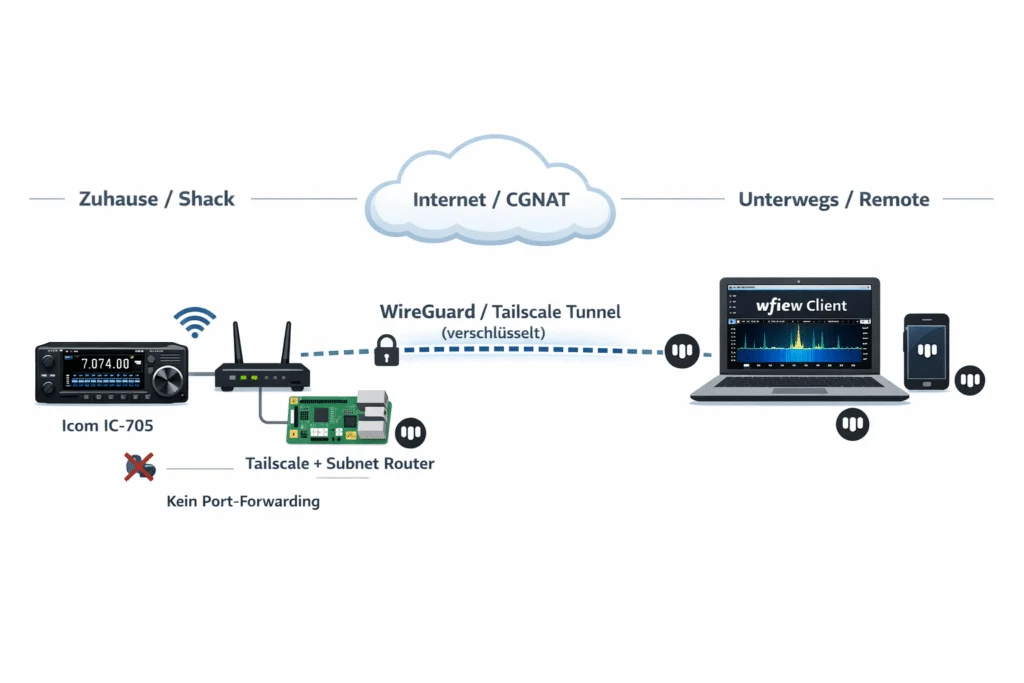
If you want to control your IC-705 remotely – from the office, a second QTH, or on vacation – the built-in Wi-Fi function and software like wfview on PC or SDR Mobile on iPhone/iPad provide a solid foundation. On the local network, this works without issues. But as soon as you want to access it over the internet, things get more interesting. If your ISP provides a public IPv4 and you can set up port forwarding, you're all set. You don't really need this article. But many ISPs – mine here in Carinthia, for example – use CGNAT. That means you share a public IP with other customers, and port forwarding is simply not possible. There are several ways to solve this. You can set up a VPS with WireGuard, use ZeroTier, or – if you only need TCP – even use Cloudflare Tunnel. All valid approaches with different pros and cons. In this article, I'll show one of these methods: Tailscale on a Raspberry Pi as a subnet router. Not because it's the only way, but because it's the one that worked most smoothly for me. On the client side, I'll demonstrate the setup with wfview (PC/Mac/Linux) and SDR Mobile (iOS) – both work flawlessly over the tunnel.Quick Overview: The Options
Before we dive into the Tailscale guide, here's an honest comparison of the common solutions. The IC-705 communicates via UDP on ports 50001-50003 (Control, CI-V Serial, Audio) – this is an important factor in the choice:| Solution | UDP Support | CGNAT-capable | Setup Effort | Cost |
|---|---|---|---|---|
| Tailscale | ✅ Native | ✅ Automatic | Low | Free |
| WireGuard + VPS | ✅ Native | ✅ (VPS has public IP) | High | ~5€/month |
| ZeroTier | ✅ Native | ✅ | Medium | Free (25 devices) |
| Cloudflare Tunnel | ❌ TCP/HTTP only | ✅ | Medium | Free |
| Port Forwarding + DynDNS | ✅ | ❌ Needs public IP | Low | Free |
What is Tailscale?
Tailscale is an overlay network based on WireGuard. It creates a virtual network ("Tailnet") between your devices. Laptop, Raspberry Pi, phone – they see each other as if they were on the same LAN. The data flows directly between devices (peer-to-peer); Tailscale itself only facilitates the connection setup. What makes it interesting for our use case:- NAT Traversal: Works automatically behind CGNAT, double NAT, firewalls, and mobile data. In most cases, a direct connection is established.
- Native UDP: Important for the IC-705 control ports.
- Subnet Router: The IC-705 doesn't need Tailscale – only the Pi (or another computer) on the same network. It forwards the traffic, and the IC-705 doesn't notice anything.
- Free for up to 3 users and 100 devices.
- No server needed, no DynDNS, no port forwarding.
What You Need
- Icom IC-705 with current firmware, Wi-Fi configured (Station Mode)
- Raspberry Pi (or another Linux machine) – connected via Ethernet to the router. Even a Pi 2 is sufficient, though the waterfall in wfview might be a bit choppy.
- Tailscale account – free, login via Google, GitHub, Microsoft, or Apple.
- wfview on your client (Windows, Mac, Linux) – free and open source.
- And/or SDR Mobile on iPhone or iPad – available in the App Store, supports the IC-705 natively over the network.
- Optional: Tailscale on your smartphone for mobile access.
Step 1: Configure the IC-705 for Network
If you're already controlling your IC-705 via Wi-Fi with wfview on the local network, you can skip ahead. For everyone else: On the IC-705, press MENU and navigate to Set → WLAN Set. The IC-705 must be in Station Mode – it connects to your Wi-Fi, not the other way around. Select the network, enter the password, done. You can find the IP address under WLAN Set → WLAN Information. It's best to assign a fixed IP via DHCP reservation in the router so it doesn't change. Mine is192.168.1.50.
Then the Remote Settings:
- Network Control: ON
- Control Port (UDP): 50001 (default)
- Serial Port (UDP): 50002
- Audio Port (UDP): 50003
- Internet Access Line: FTTH (or whatever fits your setup)
Step 2: Tailscale on the Raspberry Pi
The Pi is set up as a subnet router. It sits on the same network as the IC-705 and forwards Tailscale traffic to the local network. Connect it via Ethernet to the router – that's more stable than Wi-Fi. I'm assuming Raspberry Pi OS here. Connect via SSH and install Tailscale:curl -fsSL https://tailscale.com/install.sh | shsudo tailscale up --advertise-routes=192.168.1.0/24Important: Replace
The command outputs a link that you open in the browser to authorize the Pi.
Enable IP forwarding so the Pi forwards packets:
192.168.1.0/24 with your actual subnet! FritzBox users typically have 192.168.178.0/24, for 10.0.0.x use 10.0.0.0/24 accordingly.echo 'net.ipv4.ip_forward = 1' | sudo tee -a /etc/sysctl.d/99-tailscale.conf
echo 'net.ipv6.conf.all.forwarding = 1' | sudo tee -a /etc/sysctl.d/99-tailscale.conf
sudo sysctl -p /etc/sysctl.d/99-tailscale.confsudo systemctl status tailscaled
sudo systemctl enable tailscaledStep 3: Tailscale on the Client
Install Tailscale on the device you want to operate from:- Windows/Mac/Linux: Download from tailscale.com/download
- Android/iOS: App from the respective store
sudo tailscale up --accept-routesStep 4: Connect Client Software
The tunnel is up – now you just need the software to operate the radio. I'll show two variants here: wfview on PC and SDR Mobile on iPhone/iPad. The principle is the same for both: you use the local IP of the IC-705 (not a Tailscale IP), because the subnet router forwards traffic transparently. For the client software, it looks like you're on the local network.Option A: wfview (Windows / Mac / Linux)
Start wfview and enter in the connection settings:- Radio IP: The local IP of the IC-705, e.g.
192.168.1.50 - Control Port:
50001 - Username/Password: As configured on the IC-705
Audio tip: In wfview, set the codec to LPCM 1ch 16bit. On a narrower connection (mobile data), you can reduce the sample rate to 8000 Hz – sounds a bit muffled but is fine for SSB QSOs.
Option B: SDR Mobile (iOS)
If you prefer to operate with your iPhone or iPad, you can use SDR Mobile by Marcus Hardt (DL8MX). The app supports the IC-705 (and other Icom radios) natively over the network and offers a waterfall, audio, and control directly on the mobile device. Prerequisite: Tailscale must be installed on the iPhone/iPad and logged in with the same account. In SDR Mobile then:- Add new radio → Icom IC-705
- IP Address: The local IP of the IC-705, e.g.
192.168.1.50 - Username/Password: As configured on the IC-705
- Connect – done
Other Software
Icom's RS-BA1 works over the tunnel just as well. If you have the software, you can keep using it. Basically, any software that can access the IC-705 over the network will work – the Tailscale tunnel is transparent.Troubleshooting
If it doesn't work right away, here are the most common causes:"Connection refused" or Timeout
- Subnet route approved in the Admin Panel? (Most common error.)
- IP forwarding active on the Pi? Check with:
cat /proc/sys/net/ipv4/ip_forward– must be1. - "Accept Routes" enabled on the client? On Linux:
tailscale statusshould show the subnet route.
High Latency
Check whether the connection is direct or going through a relay (DERP):tailscale ping <IP-of-Pi>Audio Stuttering
- Reduce sample rate in wfview (8000 Hz)
- Check if peer-to-peer is active
- Ethernet connection on the Pi stable?
ping -c 20 192.168.1.50should show no packet loss
IC-705 Wi-Fi Disconnects
Happens occasionally, especially in power save mode. Assign a fixed IP in the router, and check if Power Save is active on the IC-705. A periodic ping from the Pi can help keep the connection alive:# In the Pi's crontab:
*/5 * * * * ping -c 1 192.168.1.50 > /dev/null 2>&1Tailscale Key Expired
If it suddenly stops working after months: Check in the Admin Panel whether the key has expired. Disable key expiry (see above).Security
Tailscale encrypts all communication end-to-end with WireGuard. Only devices in your Tailnet can communicate with each other. This is fundamentally more secure than open port forwarding with DynDNS, where the IC-705 control ports would be accessible to anyone. Still, a few recommendations:- Set a strong password on the IC-705
- 2FA on your Tailscale account – your identity provider (Google, GitHub, etc.) usually handles this already
- Tailscale offers ACLs that let you define which device can access which IPs/ports. Useful if you only want to expose the IC-705 and not the entire subnet.
- Use the Tailscale sharing feature with caution
Other Ways to Get There
As mentioned at the beginning: Tailscale + Raspberry Pi is one option, but not the only one. Here are a few alternatives that may be better suited depending on your situation:- WireGuard on a VPS: More control, no dependency on a third party. But you have to maintain the VPS yourself, and the configuration is more complex. For people who are comfortable with Linux administration, a very good option.
- ZeroTier: Similar concept to Tailscale, also peer-to-peer and CGNAT-capable. Free for up to 25 devices. Some prefer it because it's fully self-hostable.
- Public IP + Port Forwarding: If your ISP offers a public IPv4 (possibly for an extra fee), this is the most direct way. Then you don't need a tunnel or an intermediary machine. Security-wise, you should put a firewall and ideally a VPN in front of it.
- Instead of Raspberry Pi: Any machine that can run Tailscale (or WireGuard, or ZeroTier) works as a gateway. A mini PC, a NAS, an old laptop – whatever is available and can run continuously.