
You probably know this: You sit in front of the rig, turn the VFO and ask yourself – why is there nothing going on at 20m while the place is full at 40m? Or why does the ZS6 from South Africa suddenly come in with S9+20 at 10m, even though the tape was completely dead an hour ago?
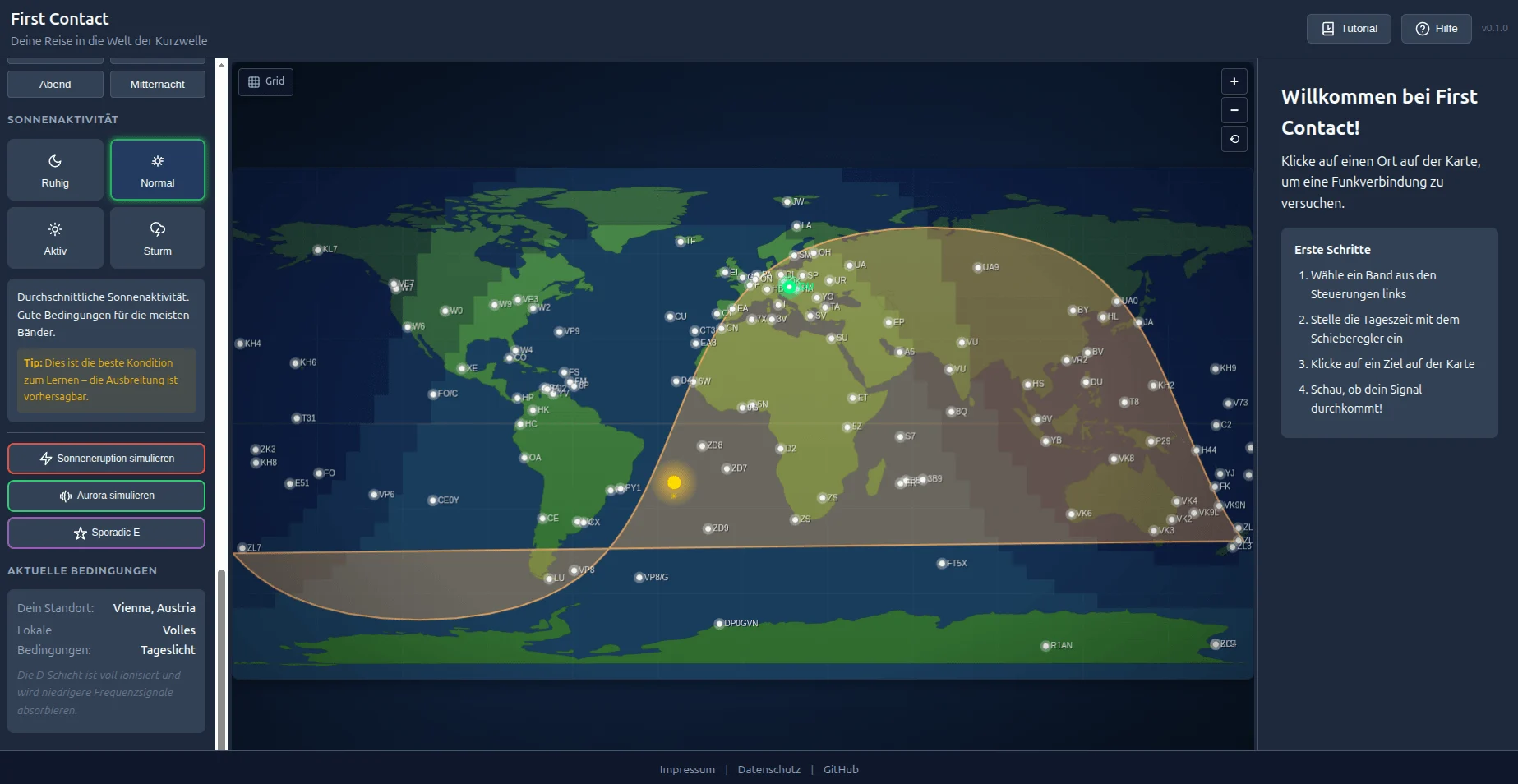
Understanding propagation conditions – for many newcomers (and let’s be honest, for some old hands too) this is sometimes like reading coffee grounds. That’s exactly why I developed First Contact: an interactive simulator that shows how shortwave signals travel around the world.
What is First Contact?
First Contact is a browser-based tool that visually displays propagation conditions on the amateur radio bands. No dry theory, no complicated formulas – instead: Try it out and understand it!
To try it out:
https://firstcontact.oeradio.at
The idea behind it is simple: click on a city on the world map and see if your signal reaches there. The tool then shows you why it worked – or not. This will help you develop a feeling for the connections between time of day, frequency and ionosphere.
Perfect for exam preparation
Anyone who is currently studying for the amateur radio exam knows the topic of “wave propagation” from the questionnaire. There is talk of the D layer, the F layer, MUF and LUF… Everything is pretty theoretical.
With First Contact you can experience these concepts live:
- Why does 80m only work at night? → Move the time slider and watch the D layer absorb everything during the day
- What is the Gray Line? → Look at the twilight zone and try connections along this “magic” line
- Why does 10m sometimes suddenly open? → Activate high solar activity and see the difference
The tutorial takes you step by step through all the important concepts – in about 5 minutes you’ll understand the basics.
11 bands from 160m to 6m
First Contact simulates all important HF bands plus the 6m “Magic Band”:
- 160m – Top band – the premier class, only at night
- 80m – The Night Owl
- 60m – NVIS specialist for regional contacts
- 40m – The workhorse – almost always works
- 30m – WARC band, the silent bringer of success
- 20m – The World Traveler – DX Volume No. 1
- 17m – The hidden gem
- 15m – Needs good conditions, but then wow!
- 12m – Like 10m, just a little more good-natured
- 10m – The spectacular performer
- 6m – The Magic Band – Sporadic E sends greetings!
Simulate special events
The special thing: You can also simulate special events that every radio amateur knows (and sometimes curses):
- ☀️ Solar flare (Mögel-Dellinger) – Suddenly there is radio silence on the day side. Anyone who has experienced this live won’t forget it.
- 🌌 Aurora – The northern lights look great, but for our signals via polar paths? Not so great.
- ✨ Sporadic E – The highlight! Activate It and try the 6m band. Suddenly stations from 1500 km away come in with signal strengths that are actually impossible. Magic!
Over 100 stations worldwide
From Vienna to Tristan da Cunha, from Antarctica to Hawaii – over 100 stations are on the map. Also rare DX targets like:
- Pitcairn Island (VP6)
- Kerguelen (FT5X)
- McMurdo Station, Antarctica (KC4)
- Easter Island (CE0Y)
This gives you a feeling for which distances are realistic on which bands.
Bilingual: German and English
The tool is completely available in German and English. Clicking on the flag changes the language.
Technical
First Contact runs completely in the browser – no installation necessary. Works on desktop, tablet and smartphone. The map shows day/night in real time, and you can use the time controller to simulate any time.
Conclusion
Whether you’re preparing for the exam or simply want to better understand why the band is the way it is – First Contact makes wave propagation tangible. Not a replacement for real spark, but a great addition to understanding.
Try it out and feel free to give me feedback!
And if you have any feature requests – always let me know.
73 de Michael OE8YML
PS: Another little hint
You can also find the tool linked here on oeradio.at under
Tools → First Contact.
If you have any ideas, suggestions or feedback about the tool, please contact us via
GitHub Issues: https://github.com/achildrenmile/firstcontact
or by email to [email protected].
🔗 Link: https://firstcontact.oeradio.at
📻 Source code: https://github.com/achildrenmile/firstcontact
